A newsletter automation strategy uses pre-written emails sent to subscribers based on their actions or chosen preferences. It helps deliver timely, relevant content, build relationships, and save significant time by automating repetitive email tasks. Key steps include defining goals, segmenting your list, choosing a platform, and mapping out your automated workflows.
What is Newsletter Automation?
Newsletter automation is a way to send emails automatically. You set up emails to go out at certain times. Or they can go out when someone does something specific.
For example, when they sign up for your list. Or when they click a link. It takes the manual work out of sending emails.
This helps you stay in touch with people who like your stuff.
Think of it like setting up a drip campaign. You have a series of messages ready. They flow to your subscribers over time.
This keeps your audience engaged. It also nurtures them as potential customers. It’s a powerful tool for any business or creator.
The main goal is to deliver personalized content. It should be relevant to each person. This happens without you having to lift a finger for each send.
It’s about setting things up once and letting them run. This frees you up to do other important things.
My Own Automation Adventure
I remember when I first started my blog. Sending out a weekly newsletter felt like a chore. I’d spend hours writing, formatting, and then hitting send.
Sometimes I’d forget to send it on the right day. Or I’d miss sending a welcome email to new subscribers. That felt awful.
My new readers were left hanging.
One day, I was deep in email writing. It was late. I looked at my clock and felt so overwhelmed.
There had to be a better way. I started reading about email automation. At first, it seemed really complicated.
I worried about breaking something. Or sending the wrong emails to the wrong people. But I took a deep breath and started learning.
I chose a simple welcome series. It had three emails. The first one arrived right after signup.
It welcomed them and set expectations. The second one shared my most popular blog posts. The third one offered a small freebie.
It was amazing to see new people getting valuable content. They got it without me doing anything extra. It felt like magic.
That’s when I knew I was hooked on automation.
Key Benefits of Automation
Saves Time: Once set up, emails send themselves.
Increases Engagement: Delivers timely, relevant messages.
Improves Deliverability: Consistent sending helps inboxes.
Boosts Conversions: Nurtures leads effectively.
Personalization: Tailors messages to subscriber actions.
Why Does Automation Matter So Much?
In today’s busy world, people get tons of emails. Yours needs to stand out. It needs to be useful.
Automation helps you do just that. It lets you send emails when they are most relevant. A new subscriber just joined.
They are excited! Sending a welcome email right away is perfect. They are thinking about your topic.
Or maybe someone downloaded a free guide. They are clearly interested in that subject. You can send them more information about it.
This is much better than sending a general newsletter to everyone. Automation allows this level of targeting. It makes your emails feel less like ads.
They feel more like helpful advice.
This builds trust. It shows you care about your subscribers. You understand what they need.
This is how you build a loyal community. It’s also how you turn casual readers into customers. You guide them gently through their journey.
You do it at their pace.
Getting Started: Your First Steps
Define Your Goals: What do you want automation to achieve? (e.g., more sales, better engagement)
Choose Your Platform: Select an email marketing service that offers automation.
Segment Your List: Group subscribers based on interests or actions.
Map Your Journeys: Plan the sequence and triggers for your automated emails.
Create Content: Write clear, valuable emails for each step.
Setting Up Your First Automation Workflow
Most email marketing platforms have an automation feature. It’s often called “Automations” or “Workflows.” Think of a workflow as a roadmap for your emails. You start with a trigger.
This is what makes the automation begin.
Common triggers include:
- A new subscriber joins your list.
- Someone fills out a specific form.
- A subscriber clicks a link in a previous email.
- A subscriber visits a certain page on your website.
- A subscriber purchases a product.
Once the trigger happens, you define the actions. These are the emails that get sent. You can also add delays.
For instance, “Wait 2 days.” This prevents overwhelming your subscribers.
You can also add conditions. For example, “Only send this email if they clicked link X.” This makes your automations very smart. They can adapt to what each person does.
It’s like having a personalized conversation with every subscriber. But it all happens automatically.
Trigger Examples for Different Goals
Welcome Series (New Subscribers)
Trigger: Subscriber joins list.
Actions:
- Email 1: Welcome, introduce yourself/brand.
- Wait 1 day.
- Email 2: Share valuable content (blog posts, tips).
- Wait 2 days.
- Email 3: Offer a free resource or discount.
Post-Purchase (Customers)
Trigger: Customer buys a specific product.
Actions:
- Email 1: Thank you, confirm order.
- Wait 3 days.
- Email 2: How-to guide for the product.
- Wait 5 days.
- Email 3: Ask for a review or offer related product.
Engagement Nurturing (Inactive Subscribers)
Trigger: Subscriber hasn’t opened an email in 30 days.
Actions:
- Email 1: “We miss you!” offer a special deal.
- Wait 7 days.
- Email 2: Ask for feedback on content preferences.
- Wait 14 days.
- Email 3: Offer to unsubscribe or change settings.
Choosing the Right Platform
Picking the right email marketing service is important. Many great options are available. Some popular ones include Mailchimp, ConvertKit, ActiveCampaign, and HubSpot.
Each has its strengths. Consider your budget. Think about how many subscribers you have.
Most importantly, look at their automation features.
Does the platform offer visual workflow builders? This makes it easy to see your automation. Can you create segments easily?
This is key for sending the right messages. Does it integrate with other tools you use? Like your website or CRM?
For beginners, Mailchimp or ConvertKit are often good starting points. They are user-friendly. Their automation tools are powerful enough for most needs.
As your business grows, you might look at more advanced options. Like ActiveCampaign. It offers very sophisticated automation and CRM features.
Don’t get too caught up in finding the “perfect” platform. The most important thing is to start. You can always switch later.
The strategies you learn will transfer. Focus on building your content first.
Content is Still King (Even with Automation)
Automation sends your messages. But the messages themselves must be good. Your emails need to be valuable.
They should be interesting. They need to speak directly to your audience. Even the most automated system fails if the content is weak.
Think about what your subscribers want to know. What problems can you solve for them? What information do they need?
Your automated emails should answer these questions. Use a friendly, conversational tone. Write like you’re talking to a friend.
Keep your sentences short. Use simple words.
Each email in your automation sequence should have a clear purpose. The welcome email should make them feel good. The educational emails should teach them something.
The offer emails should be compelling. Don’t just sell all the time. Build a relationship first.
Value comes before sales.
Crafting Engaging Automated Emails
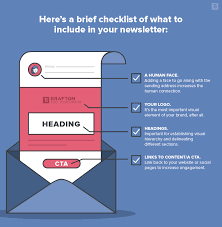
- Subject Line: Make it clear and enticing. Use emojis sparingly.
- Opening: Start with a friendly greeting.
- Body: Keep it focused. One main point per email. Use short paragraphs. Break up text with lists.
- Call to Action (CTA): What do you want them to do next? Make it clear. Use a button or a clear link.
- Closing: Sign off with your name or brand.
Segmenting Your Audience: The Secret Sauce
One of the biggest powers of automation is segmentation. This means dividing your email list into smaller groups. You send different emails to different groups.
This makes your emails much more relevant. And relevance is key to engagement.
How can you segment your list? Here are some common ways:
- Demographics: Age, location, gender (use with care and only if relevant).
- Interests: What topics have they shown interest in? (e.g., clicked on certain blog posts)
- Behavior: Have they purchased a product? Have they visited a specific page? Are they a new subscriber or a long-time one?
- Engagement Level: How often do they open your emails?
When you use segmentation with automation, magic happens. For example, if someone buys your “Gardening for Beginners” book, you can add them to a “Gardening Enthusiast” segment. Then, your automation can send them more tips about gardening.
Or offers for related products.
This is far more effective than sending the same email to everyone. Imagine getting an email about advanced woodworking if you’ve only ever shown interest in basic knitting. It feels irrelevant.
Segmentation stops this. It makes your emails feel personal. Like they were made just for that person.
Segmentation Ideas for a Blog
- Topic Interest: Based on which blog posts they read or links they click.
- Content Type: Do they prefer guides, tutorials, or opinion pieces?
- Lead Magnet Download: Those who downloaded a specific freebie.
- Purchase History: For e-commerce sites, this is crucial.
- Engagement Score: High engagement vs. low engagement subscribers.
Automated Emails for Different Business Types
No matter what you do, automation can help. Let’s look at some examples.
For E-commerce Stores
Welcome series for new customers. Abandoned cart emails to remind people about items left in their cart. Post-purchase emails with product tips or review requests.
Win-back campaigns for inactive customers. Birthday emails with special discounts.
For Bloggers and Content Creators
Welcome sequence introducing your blog. Series of emails sharing your best content. Automated emails promoting a new blog post.
Nurturing sequences for people interested in a specific topic you cover. Drip campaigns to build an audience for an online course or ebook.
For Service-Based Businesses
Automated follow-ups after a consultation. Emails to onboard new clients. Information series explaining your services.
Campaigns to gather testimonials or reviews. Nurturing leads who downloaded a free guide related to your services.
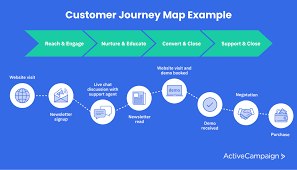
The key is to think about your customer’s journey. Where do they start? What information do they need at each step?
How can you guide them toward their goals? Automation helps you deliver that guidance consistently.
Common Automation Scenarios
Scenario: Someone signs up for your free checklist.
Automation: Send the checklist immediately. Then, 2 days later, send an email with related tips. 5 days later, offer a discount on your related ebook.
Scenario: A customer buys a product from your online store.
Automation: Send an order confirmation. Then, 3 days later, send a “How to Use Your Product” guide. 7 days later, ask for a product review.
Scenario: A subscriber hasn’t opened emails for 60 days.
Automation: Send a re-engagement email with a special offer. If they still don’t open, send a final check-in. If no response, consider removing them from the active list.
Measuring Success: What to Look For
Once your automations are running, you need to track them. How do you know if they are working? Most email platforms give you analytics.
Look at key metrics.
Open Rate: What percentage of people open your emails? A higher open rate means your subject lines are good. And people are interested.
Click-Through Rate (CTR): What percentage of people click a link in your email? A good CTR means your content is compelling. And your call to action is clear.
Conversion Rate: Did the email lead to the desired action? Like a purchase or a signup? This is the ultimate measure of success.
Unsubscribe Rate: How many people are opting out? A high rate could mean your content isn’t relevant. Or you’re sending too many emails.
Review these numbers regularly. Maybe weekly or monthly. Look for trends.
Are certain emails performing better than others? Can you tweak the subject lines? Or the content?
A/B testing is a great way to improve your automations. Test different subject lines or calls to action.
Don’t be afraid to make changes. Automation is not “set it and forget it” forever. It’s a living system.
It needs your attention. Small tweaks can make a big difference over time. This helps you constantly improve your results.
Key Performance Indicators (KPIs) to Track
- Open Rate: Percentage of recipients who opened the email.
- Click-Through Rate (CTR): Percentage of recipients who clicked a link.
- Conversion Rate: Percentage of recipients who completed the desired action.
- Unsubscribe Rate: Percentage of recipients who unsubscribed.
- Bounce Rate: Percentage of emails that couldn’t be delivered.
Common Pitfalls to Avoid
While automation is powerful, it’s easy to make mistakes. Here are some common ones.
Too Many Emails Too Soon: Bombarding new subscribers can overwhelm them. Start slow. Build trust.
Use delays between emails in a sequence.
Lack of Personalization: Generic emails feel impersonal. Use segmentation. Use merge tags (like the subscriber’s first name).
Make them feel seen.
Not Updating Content: Your automated emails are static. But your business and offerings change. Review your content periodically.
Make sure it’s still relevant and accurate.
Ignoring Analytics: If you don’t measure, you can’t improve. Check your stats. See what’s working and what’s not.
Complex Workflows Too Early: Start with simple automations. Like a welcome series. Get comfortable with the platform.
Then build more complex journeys.
Poorly Written Emails: Automation only works if the content is good. Always proofread. Ensure your message is clear and valuable.
Avoiding these issues will help your automation strategy succeed. It ensures you’re building relationships, not annoying people.
The Future of Newsletter Automation
Newsletter automation is constantly evolving. Artificial intelligence (AI) is playing a bigger role. AI can help write email copy.
It can suggest optimal send times. It can even predict which subscribers are most likely to engage or buy.
More advanced platforms are offering predictive segmentation. They can identify subscribers at risk of churning. Or those ready to become a loyal customer.
This allows for even more precise targeting. Your emails can be sent at the exact moment they are most impactful.
Personalization will continue to be king. As technology improves, the ability to deliver truly one-to-one experiences will grow. This means moving beyond just using a first name.
It means tailoring content based on deep understanding of individual needs and preferences. Automation is the engine that makes this possible.
The goal is always to provide value. To make the subscriber’s life better. To build a strong connection.
Automation is simply the tool that helps you do this at scale. It allows for consistent, timely, and relevant communication. Which is what people want in a noisy digital world.
Your Newsletter Automation Strategy Blueprint
Here’s a simple blueprint to get you started:
Step-by-Step Strategy
1. Define Your Core Goal(s): What is the main thing you want to achieve? (e.g., increase sales by 15%, grow email list by 20%)
2. Identify Key Subscriber Journeys: What are the most common paths your audience takes? (e.g., new signup -> engaged reader -> customer)
3. Choose Your Automation Triggers: What actions will start your automated emails?
4. Map Your Workflow Sequences: Plan the order, timing, and content of emails for each journey.
5. Create High-Quality Content: Write engaging, valuable emails for each step. Focus on clarity and relevance.
6. Implement Segmentation: Group subscribers based on their actions and interests.
7. Select and Set Up Your Platform: Choose an email marketing tool that fits your needs.
8. Test and Launch: Send test emails to yourself. Check everything.
Then activate your automation.
9. Monitor and Optimize: Regularly review your analytics. Make adjustments to improve performance.
What This Means for You
Newsletter automation means less busywork for you. It means more consistent communication with your audience. It allows you to build stronger relationships.
And to grow your business or reach more people. It’s about working smarter. Not harder.
It means you can focus on the creative parts of your work. Like creating great content or products. While the system takes care of sending out your messages.
It ensures no one falls through the cracks. Every new subscriber gets a warm welcome. Every interested person gets relevant follow-up.
When you see your engagement rates go up. And your list grow steadily. You’ll know your automation strategy is paying off.
It’s a foundational element for modern digital success. It helps you connect with your audience authentically and effectively.
Quick Tips for Better Automation
Here are some easy tips to make your automations work better:
- Keep it simple at first. Don’t try to build everything at once.
- Use clear and compelling subject lines. This is the first thing people see.
- Write like you talk. Be natural and friendly.
- Always have a clear call to action. Tell people what you want them to do.
- Proofread everything. Typos look unprofessional.
- Segment your list as much as possible. Relevance is key.
- Test your automations thoroughly. Make sure they work as expected.
- Review your analytics regularly. Look for ways to improve.
- Don’t be afraid to experiment. Try new things. See what works best.
Frequently Asked Questions about Newsletter Automation
What is the main difference between a newsletter and an automated email sequence?
A traditional newsletter is usually a one-off email sent manually to your entire list at a specific time. An automated email sequence, or workflow, is a series of pre-written emails triggered by a subscriber’s action (like signing up) and delivered automatically over time. They are personalized and timely.
How long should my automated emails be?
Keep them short and to the point. Aim for 2-3 sentences per paragraph. Most emails should be readable in under a minute.
Focus on delivering one clear message per email. This helps with engagement and reduces the chance people will stop reading.
Can I automate emails to re-engage inactive subscribers?
Yes, absolutely! This is a very common and effective use of automation. You can set up a workflow that triggers when a subscriber hasn’t opened an email in a set period (e.g., 30 or 60 days).
This sequence might offer a special discount, ask for feedback, or gently suggest they unsubscribe if they’re no longer interested.
What is a “trigger” in newsletter automation?
A trigger is the specific action a subscriber takes (or a condition that is met) that starts an automated email sequence. Common triggers include a new subscriber joining your list, a user clicking a link in a previous email, filling out a specific form on your website, or making a purchase.
Do I need a lot of technical skills to set up email automation?
No, not usually. Most modern email marketing platforms have user-friendly visual builders for creating automation workflows. You don’t need to be a programmer.
You’ll need to understand your audience and content, but the technical setup is designed to be accessible.
How often should I send automated emails?
It depends on the sequence and your audience. For welcome sequences, sending emails every 1-3 days is common to introduce new subscribers. For other nurture sequences, you might wait 5-7 days between emails.
The key is not to overwhelm people. Always consider the subscriber’s experience and the value you’re providing.
Conclusion
Newsletter automation is more than just a tool; it’s a strategy for connection. It lets you reach people at the right moment. With the right message.
It saves you time. And builds stronger relationships with your audience. Start simple, focus on value, and watch your communication grow.
You’ve got this!